
For companies that use SAP BTP, the platform is the obvious place for identity governance. As of today, Nova IAM runs on the Cloud Foundry runtime of SAP BTP.
Benefits in operation
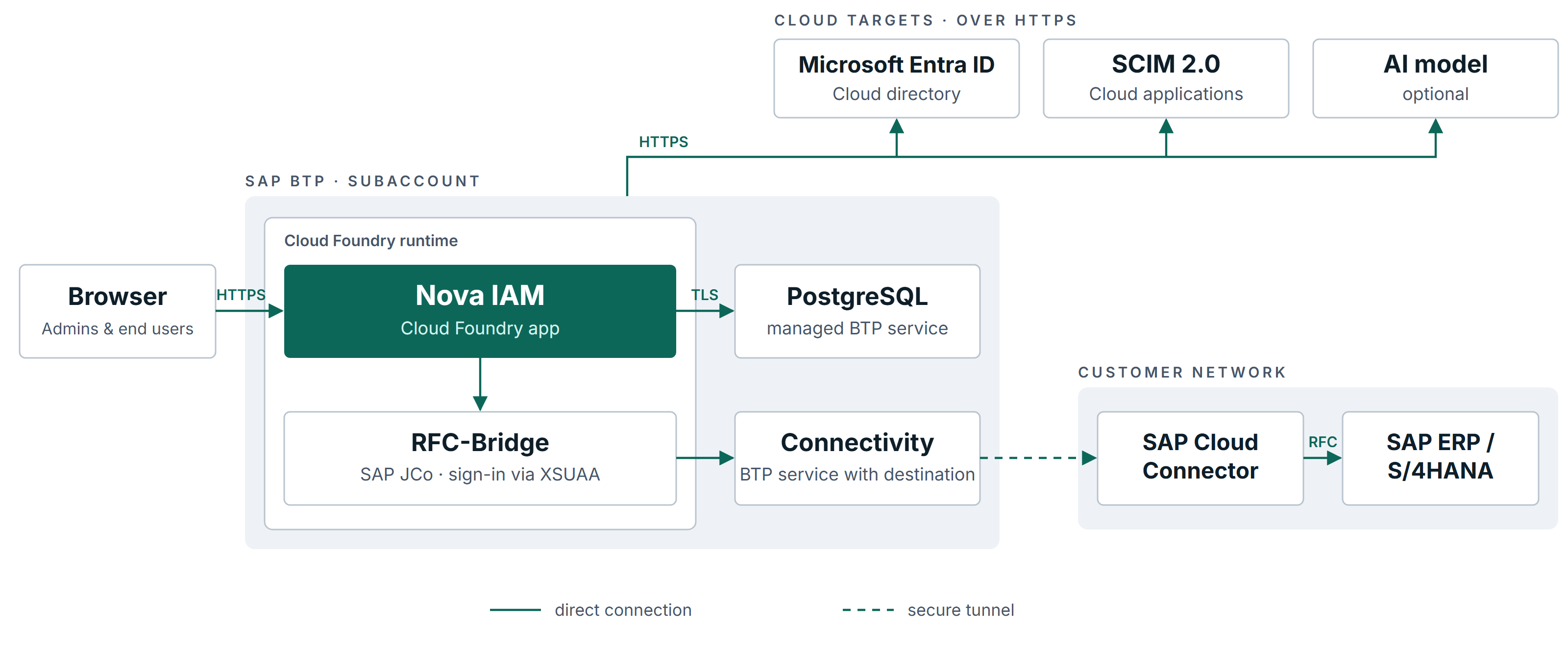
- No dedicated Kubernetes cluster: Nova runs as a Cloud Foundry app in a BTP subaccount.
- Considerably cheaper than on Kyma: SAP bills by the app’s memory, not for a whole cluster.
- Managed database: Nova uses PostgreSQL on SAP BTP, connected over TLS. Credentials and keys come from the platform via service bindings.
- SAP in the customer network: through the SAP Cloud Connector, Nova reaches SAP systems behind the firewall. The RFC bridge uses SAP JCo, SAP’s established RFC library. It is currently read-only: status check and user lookup. Write access to SAP is not available there. Provisioning in SAP requires the self-hosted edition.
Built to run on the platform
During platform updates, Cloud Foundry starts a replacement instance before the old one stops. Nova is built for this: schedules and background jobs always run in exactly one instance, and running provisioning is left alone. Nova won’t start without its keys, and its logs go straight into the Cloud Foundry logs.
Three editions
Nova IAM is available self-hosted on your infrastructure, on SAP BTP and, from 2027, as a hosted service. All changes in release 2026.10.2 are in the changelog.